| Previous Page |
PCLinuxOS Magazine |
PCLinuxOS |
Article List |
Disclaimer |
Next Page |
DOSBOX Pure: Run Your Old DOS Games On PCLinuxOS |
|
by Agent Smith (Alessandro Ebersol)
 So, friends, the famous Disk Operating System, also known as PC-DOS, IBM-DOS, or MS-DOS, depending on who sold the computer/system, was one of the most famous operating systems that ever existed. And it still exists. DOS is still being developed, such as FreeDOS, and there is still equipment, whether embedded electronics, handhelds, or industrial computers that still run on the DOS standard. We cannot estimate, either humanly or with AI (and I tried), how many programs have been made for DOS, and thanks to the almost unlimited library of programs for this operating system, it is still very popular among computer users. I bet that you, reading this now, have a favorite DOS game that you occasionally play to satisfy your urge to game and remember the good old days (when Microsoft still had some competence). The options we have today to revive old DOS programs are DOSEMU and DOSBOX. DOSEMU is somewhat complicated to get working, so that leaves us with DOSBOX.
DOSBOX is a very easy-to-use application, it is stable, and it runs many DOS programs. However, despite being relatively easy and not very complex, it does have some issues:
As I mentioned above, the original DOSBOX stopped at version 0.74.3, but numerous forks have emerged. Namely:
 DOSBox Pure is an innovative fork of the original DOSBox emulator, designed specifically to enhance the emulation experience of old DOS-based software. While DOSBox is widely appreciated for its ability to run DOS software on modern operating systems, DOSBox Pure elevates the experience by introducing features focused on ease of use, compatibility, and improved performance. Initially developed as a Retro Arch core, it was recently released as a standalone program, the Unleashed version. It was this version that I packaged and tested, and now I bring you an overview of some of its features. One of the standout features of DOSBox Pure is its goal of simplifying the configuration process for users. Unlike the original DOSBox, which often requires significant configuration for games to run smoothly, DOSBox Pure simplifies this with automatic game configuration detection. Simply drag the game ISO or the folder with the game already installed into the main DOSBox Pure window, and it will do the rest, asking a minimum of questions about the game and then running it. DOSBox Pure also improves compatibility with modern hardware. While classic DOSBox sometimes struggles with modern peripherals, Pure integrates improved mouse and joystick handling, ensuring a more seamless experience when running games that rely on these inputs. DOSBOX Pure has support ready for Xbox 360 joysticks, a current standard. In addition, the emulator supports high-resolution scaling and shading effects, which enrich the visual presentation of older titles without compromising their nostalgic aesthetic. It is possible to run games compatible with accelerated hardware, such as 3DFx, at resolutions up to 4K.
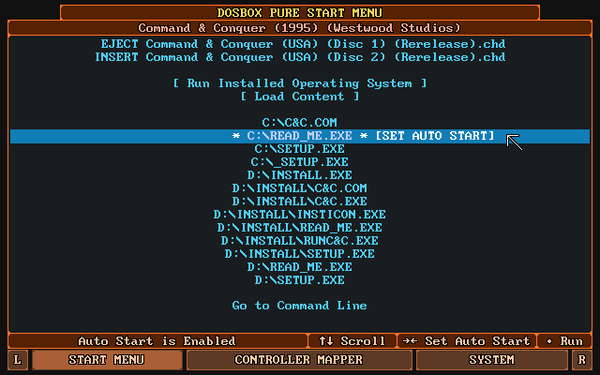
The system will automatically mount the first disk image found as drive A: or D:. Additional disks can be loaded or swapped using the Start menu.
 This is the first screen that appears after loading a game. It provides a joystick-controlled list of all executable files for the loaded game. It also allows you to load new content and switch the inserted disk or CD. Using the tabs at the bottom, you can view the Control Mapper, System Settings, and, while a game is running, access the Virtual Keyboard.  While a game is running, you can open the menu again by pressing CTRL+F12 or L3 on the controller (usually by pressing the left analog stick). The keyboard shortcut can be modified in System Settings, and the controller button can be changed in the Control Mapper. Since DOSBOX Pure is a software with an emphasis on ease of use and intuitiveness, configuring it is very simple.
On the main screen, the start menu, look for the SYSTEM tab at the bottom of the screen.  And it will open the settings menu 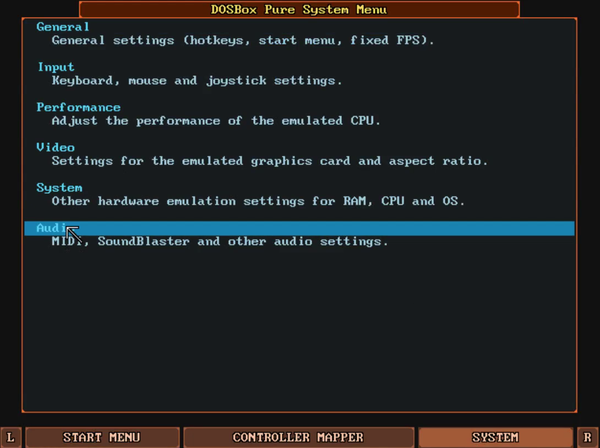 Here in this section, you can configure various aspects of the emulator. Let's highlight some important details. In the General section, you can configure various hotkeys and aspects of the emulator related to emulation speed, fast forward, frame-by-frame execution, and access to the DOSBOX.CONF already existing on the machine. In this menu, you can load the configuration files for a standard DOSBOX installation, which will allow DOSBOX Pure to access your DOS program drive (the folder where you mount your DOS C: drive, if you already have the standard DOSBOX installed), and thus, the execution of your installed programs will be transferred to DOSBOX Pure. In the INPUT section, you can configure various types of input devices: mouse, joysticks, and keyboards. It is also possible to change the keyboard mapping to a keyboard other than EN-US. 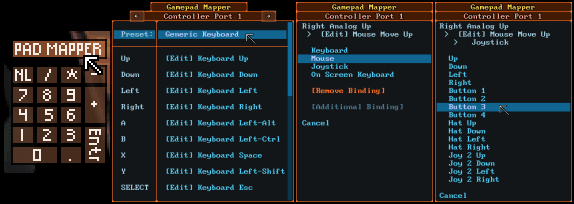 In the Performance section, you can configure the type of machine you want to emulate and access the performance of the emulated machine, with the display of FPS and other information. In the Video section, you can configure various features for the video emulated in DOSBOX Pure, from the type of video card to the available video memory, and one of the most interesting features of DOSBOX Pure: 3DFx video card emulation.
DOSBOX Pure includes emulation of a 3dfx Voodoo PCI card. Compatible DOS games should work immediately. There are a few kernel options related to this feature: Video > 3dfx Voodoo Emulation: By default, a compatible 8 MB memory card with a texture mapping unit is emulated. This can be changed to an experimental 12 MB card with two TMUs, a 4 MB card, or the support can be disabled. Video > 3dfx Voodoo Performance Settings: By default, the kernel will use fast OpenGL hardware acceleration to render 3dfx graphics. This setting can be used to switch to software rendering with more faithful emulation, but at a much higher CPU cost. Video > 3dfx Voodoo OpenGL Scaling: Use this setting to increase the OpenGL rendering resolution. In the Audio section, some precautions must be observed. We will list them below.
The audio in DOSBOX Pure can be challenging. Unlike regular DOSBOX, DOSBOX Pure does not emulate an FM sound card with standard MIDI sounds. In fact, you must provide SOUND FONTS for DOSBOX Pure to emulate a sound card. SOUND FONTS are files in SF2 format and must be placed in the ~/.config/DOSBoxPure/system/ folder. You can also use the SOUND FONTS from your installed system if you already have sound fonts for MIDI emulation installed.
An interesting website for downloading SOUND FONTS is I downloaded two SOUND FONTS and tested each one to see which one would sound best. 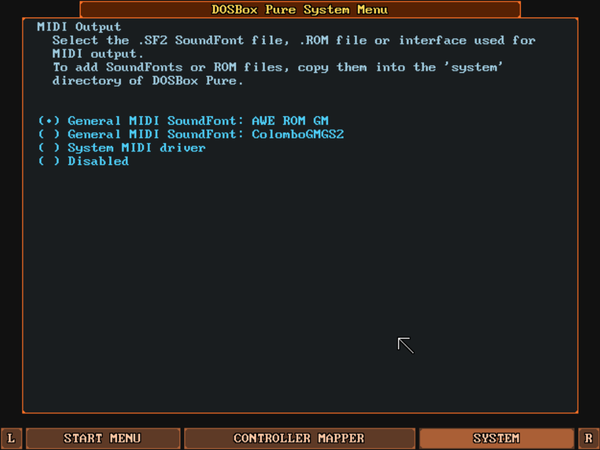 However, after some work to get the audio working, I still couldn't get DOSBOX Pure to “sing,” so to speak.
The silence of DOSBOX Pure was not unique to me. Going to the project's GITHUB, I saw that there was an open ticket from several distros that were unable to get audio with DOSBOX Pure. It should be noted that all non-Debian/Bunto distros had no sound. Oh, oh... What could be the problem? It turns out that the author, Bernhard Schelling, made a hard-coded mistake. He instructs DOSBOX Pure to look for an audio library in a location that is only correct on Debian-derived distros, /usr/lib/x86_64- linux-gnu/. To get sound working on PCLinuxOS, you must do the following: As root, create the following folder: mkdir /usr/lib/x86_64-linux-gnu Then, create a symbolic link pointing to where the audio library is located: ln -s /usr/lib64/libasound.so.2 /usr/lib/x64_64-linus-gnu/libasound.so.2 And that's it, your DOSBOX Pure will sing like a nightingale. The author has acknowledged the error and will correct it in the next version.
I sent the package before writing this article, so I hope it will already be in the PCLinuxOS repositories when the November 2025 issue of PCLOS Magazine comes out. To install, just run apt-get install dosboxpure in a terminal, or through Synaptic or DNF Manager. Once installed, just click on the icon and the program will open the initial window. Then, drag a folder, a .ZIP file, or an ISO image into the main window and run the game/program. 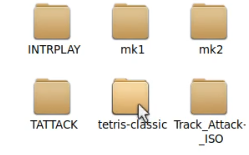

 I hope you enjoy it, as this DOS emulator makes it much easier to run a vast library of DOS programs, with modern features such as 3DFx emulation and resolutions up to 4K. |